Musicolet Music Player
- 4.6
- Rating
- 10.00M
- Installs
- Free
- Price

 Analysis by App-foxy
I tried Musicolet Music Player as a local music app rather than as a replacement for a streaming service, and that distinction matters from the first minute. It is designed around the music already stored on your device, with tools for organizing playback, adjusting sound, and working with lyrics. If your goal is to press play on downloaded albums without being pushed toward an online catalog, its focused approach feels refreshingly direct.
Musicolet comes from Krosbits and sits in the Music & Audio category. It is free to start, suitable for Everyone, and has built a strong audience with a 4.7 average from around 231 thousand ratings and over 10 million installs. Optional in-app purchases range from $6.99 to $135.00 per item, so I would look at the purchase screen carefully before paying for anything. The app first appeared on June 24, 2016, but its appeal is less about novelty than about giving local files more control.
What to expect from the player
The first thing I noticed is that Musicolet does not behave like the usual streaming-first music apps. You are not opening it to browse a huge remote library, discover editorial playlists, or search for tracks you have not saved. Instead, the app asks you to think about your own collection: albums, folders, playlists, queues, and the way you want songs to sound.
You May Also Like

 Pandora - Music & Podcasts
Pandora’s Music Is Easy to Start, but Harder to Recover
Pandora’s strength is its low-effort path from a seed to a station. Its weak spot is how much confidence it asks you to place in connection, setup, and quiet recovery.

 AccuWeather: Weather Radar
AccuWeather Review: A Quick, Clear Forecast for Everyday Decisions
For everyday plans, the best forecast is the one you can understand quickly. AccuWeather makes rain timing, radar, and local conditions easy to act on, with a few trade-offs.

 Hill Climb Racing
Why Hill Climb Racing Still Turns Crashes Into One More Run
A tiny car, a bumpy hill and one more upgrade: Hill Climb Racing keeps resurfacing because its simple chaos makes every near-miss feel personal.

 AliExpress - Shopping App
AliExpress Makes Global Shopping Feel Personal, but Shoppers Bear the Risk
AliExpress turns a global marketplace into a pocket-sized discovery engine. Its reach is useful, its shopping loop compelling, and its trade-offs easy to miss.

 Lords Mobile: Kingdom Wars
Lords Mobile Is a Kingdom-Building Routine, Not a Quick Match
A case-by-case verdict on the building, battles, device demands, and social commitments that make Lords Mobile rewarding for some players and exhausting for others.

 PDF Scanner app - TapScanner
TapScanner Makes Paperwork Easier to Capture, Check, and Share
TapScanner makes scanning with a phone feel less like a rescue operation and more like a dependable step in getting work done. Its capture tools are useful, though not flawless.
More From Our News Desk
View All News


That makes it a particularly good fit for someone who keeps purchased music, downloaded mixes, recordings, or transferred albums on an Android device. It can also suit listeners who dislike the interruptions and account-centered design common in streaming alternatives. On the other hand, if most of your listening starts with finding unfamiliar artists online, Musicolet will feel limited because its strength is playback management, not catalog discovery.
The store summary points to multiple queues, separate equalizers, synchronized lyrics, and additional tools. In practice, those features suggest a player built for people who want different listening situations kept apart. I found the idea of separate queues more useful than it sounds: a queue for a commute does not have to replace the songs waiting for a relaxed evening, and a temporary selection does not need to become a permanent playlist.
There is also a useful difference between a queue and a playlist. A playlist is something I would prepare and keep, such as an album collection or a workout selection. A queue is more temporary and better for deciding what should play next without reorganizing the library. New users often treat both as the same thing, but separating those jobs is one of the app’s more practical ideas.
The interface is not trying to imitate a glossy streaming service. That can be a benefit when you already know what you want to hear, although it may take a little time to understand where library organization ends and playback control begins. I would not judge it after only opening a song. Its value becomes clearer once you create a queue, adjust a song, and return to the same collection later.
Who will get the most from it
I would recommend it to listeners who maintain their own files and want more control than a basic phone player provides. It is also worth considering if you switch between headphones, a car, and a small speaker and want sound adjustments to follow those situations more intelligently. People who annotate or follow lyrics while listening may appreciate the lyric tools, especially when they are willing to do some preparation instead of expecting every song to be ready automatically.
I would be more cautious if you rely on cloud synchronization across several devices, want recommendations based on listening history, or expect a music service to supply every album. Musicolet is not the best answer to those needs. A streaming app is usually more convenient for discovery and a cloud-based library is generally easier when your collection must remain identical everywhere.
Setting it up without getting lost
After installing the app, my advice is to begin with the music library rather than immediately changing every visual or audio option. Give Musicolet a chance to identify the files you actually want to play, then check whether the way it groups them matches your habits. If you keep music in several locations, this is the stage where a little organization saves time later.
Do not worry if the first screen feels less familiar than a streaming home page. You are not supposed to wait for recommendations to appear. The meaningful starting point is your own collection. Find one album or folder you recognize, open it, and play a track. That simple action confirms that the library is usable before you spend time building elaborate playlists.
Once playback works, I suggest making one small playlist with a clear purpose. I used the idea of a short evening queue rather than trying to classify every song at once. This reveals how Musicolet handles permanent selections compared with temporary playback decisions. It also gives you a practical destination for testing the app instead of wandering through settings.
The multiple-queue approach deserves attention during setup. If you often alternate between a long album and a handful of individual songs, separate queues can prevent one listening plan from disturbing another. A useful workflow is to keep an album queue intact, then create another queue for spontaneous tracks. That is less frustrating than repeatedly rebuilding the same sequence.
New users should also decide how much organization they really need. Musicolet offers enough control to encourage detailed sorting, but not every listener benefits from managing every category. If your collection is small, start with albums and one or two playlists. If you have years of files, folders and carefully named tracks become more important, and the app’s organization tools have more room to prove their value.
Making sound adjustments practical
The separate equalizer idea is one of the more interesting reasons to choose this player, but I would not begin by chasing a dramatic bass boost. First listen to a familiar song at a comfortable level. Then make one small adjustment and compare it with the original. This approach makes it easier to tell whether a change genuinely improves the experience or simply sounds louder.
Separate audio settings are especially useful when your listening equipment changes. A setting that works for compact earbuds may make a speaker sound muddy, while a profile that suits a car can be tiring through headphones. The important trade-off is that customization takes attention. If you want one universal sound with no maintenance, a simpler player may be more convenient.
I also found that equalizer controls are best treated as problem-solving tools rather than decoration. If vocals disappear behind instruments, adjust with that specific issue in mind. If bass overwhelms the rest of the track, reduce it instead of adding more effects. Musicolet gives you room to experiment, but it cannot turn poor recordings into studio-quality files.
Getting to the first useful result
The first meaningful success is not merely hearing a song. It is building a small listening setup that behaves the way you expect. I would choose a familiar album, place a few additional songs in a separate queue, and then test a sound adjustment on the headphones you use most. That sequence covers the app’s central strengths without requiring a long tutorial.
Lyrics are another feature worth testing with a song you know well. Synchronized lyrics can make a player feel much more personal, but the benefit depends on having suitable lyric content and taking the time to align it when necessary. The practical insight is that lyric work is an activity in its own right: if you care about timing, check the result while the song is playing rather than assuming that pasted text will automatically follow the music.
For a realistic everyday example, imagine leaving home with an album already stored on your phone. Before starting the walk, you can prepare a queue that begins with the album and follows it with a few tracks chosen for the return trip. If your earbuds make the vocals too quiet, you can adjust the relevant equalizer setup without rebuilding the playlist. Later, you can return to a different queue for a completely separate listening session.
That workflow is where the app feels more capable than a basic file player. You are not just opening folders and tapping songs; you are creating repeatable listening situations. At the same time, it remains more hands-on than streaming. The music has to be on your device, and the organization is yours to maintain.
Common points of confusion
The biggest source of confusion is expecting Musicolet to search for music in the same way as a streaming service. It is better to think of it as a personal library manager and player. If an album is not part of your local collection, the app is not designed to solve that discovery problem for you. Understanding this early prevents the wrong first impression.
Queues can also seem confusing because they are less permanent than playlists. When I want a selection to remain available for repeated use, I save it as a playlist. When I only want to control what plays during the current session, I use a queue. Keeping those purposes separate makes the interface much easier to understand.
Lyrics require similar patience. A synchronized lyric display is valuable when it works, but it is not the same as an automatic guarantee that every track will have perfectly timed words. I would treat lyric creation as a useful customization project for favorite songs, not as a reason to expect every file in a large collection to be ready immediately.
Another point to watch is the difference between changing playback behavior and changing the underlying music file. Equalizer adjustments affect how you hear the track through the app; they do not repair or remaster the recording itself. If a file is poorly encoded or badly mixed, audio controls may soften the problem but will not remove it.
The purchase options may also deserve a deliberate look. The app is free, but optional items can cost from $6.99 to $135.00 each. I would avoid tapping through a purchase simply because an advanced setting looks interesting. First use the free experience long enough to decide whether Musicolet’s local-library approach fits your habits, then evaluate any optional upgrade on its actual benefit to you.
How it compares with familiar alternatives
Compared with a basic built-in phone player, Musicolet offers a more intentional way to manage listening. Multiple queues, separate equalizers, and lyric tools give it a wider range of personal workflows. The trade-off is that a basic player may feel faster for someone who only wants to tap a file and hear it once.
Compared with streaming services, Musicolet gives up online discovery in exchange for control over local music. You are less dependent on a subscription catalog, but you must supply and organize the files yourself. For someone with a carefully maintained collection, that is a fair exchange. For someone who changes favorite artists every week and rarely downloads albums, streaming remains the easier choice.
Compared with a cloud-centered music library, the app’s local focus can feel both liberating and restrictive. You have direct control over the files and playback environment, yet moving that carefully arranged experience to another device may require more personal effort. I would choose it when local ownership and offline access matter more than seamless multi-device continuity.
Its strongest advantage is not one isolated button. It is the way several modest tools work together: a local collection, separate listening queues, audio adjustments, and lyrics that can be prepared to suit you. Its main weakness is the same philosophy. Musicolet expects participation. It rewards listeners who enjoy arranging their music, but it is less attractive to anyone who wants the app to make all the decisions.
The next step after the first session
After the initial setup, I would resist the temptation to rebuild your entire library in one sitting. Pick one regular situation, such as commuting, studying, or relaxing at home, and create a playlist for it. Then use a separate queue when you want a one-off sequence. This gives you a clear test of whether the app actually reduces friction in your routine.
If you enjoy lyrics, start with a few songs you play often and check the synchronization carefully. If audio customization matters, create a small number of sensible sound setups instead of changing settings for every track. These two habits reveal whether Musicolet’s deeper controls are helping you or simply adding maintenance.
I also recommend keeping your naming and folder habits consistent. A powerful player cannot fully compensate for a chaotic collection. Clear album information and predictable organization make browsing faster, while a messy library can make even good controls feel overwhelming. The app gives you useful structure, but it works best when the files themselves are reasonably tidy.
My final view is that Musicolet is a strong choice for Android listeners who want a serious local music player without the distractions of a streaming home screen. Krosbits has built something that feels especially rewarding once you understand the difference between queues, playlists, audio profiles, and lyric preparation. It is free to begin, rated Everyone, and widely used, but popularity is not the main reason I would install it.
I would install it because it lets me shape playback around my own collection. If you already have music on your device and want more control than the default player provides, the learning curve is worthwhile. If you mainly want instant access to an enormous online catalog, personalized discovery, or effortless synchronization between devices, choose a different kind of music app. For the right listener, though, Musicolet Music Player is a practical tool for turning stored files into a genuinely organized listening experience.
FAQs for Musicolet Music Player
01What features make Musicolet Music Player stand out from other music apps?
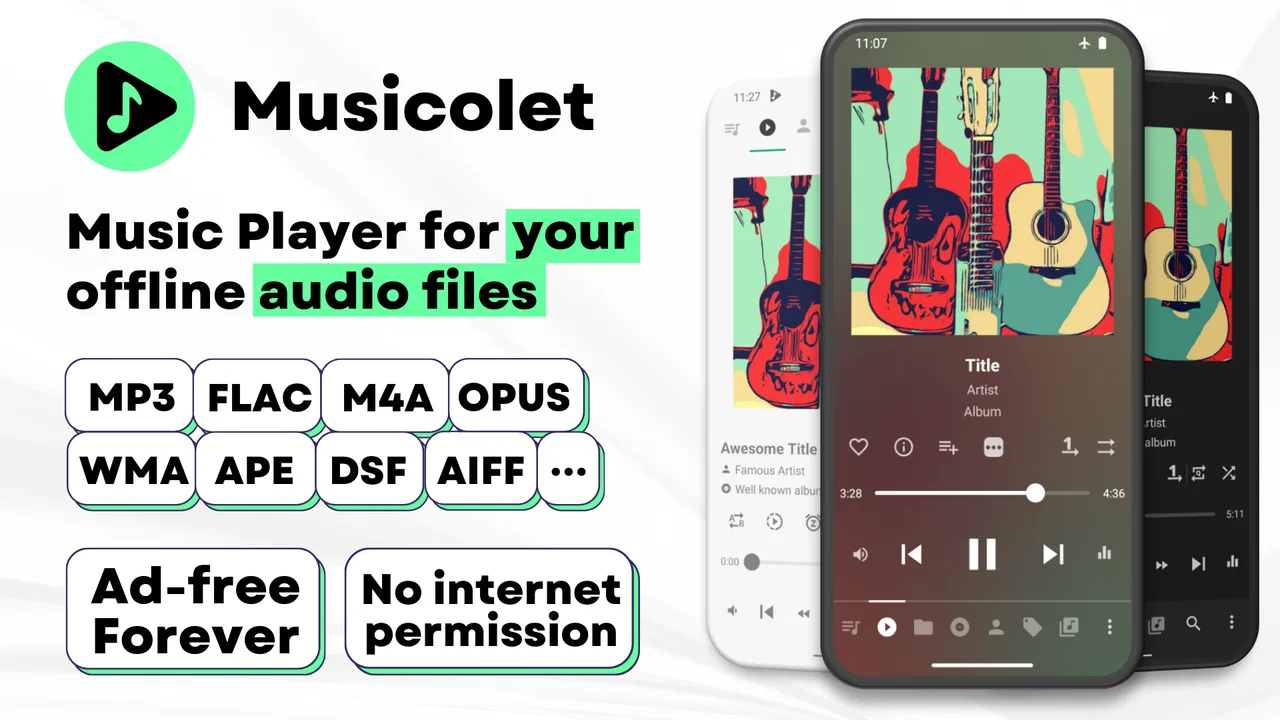
Musicolet Music Player is unique for its offline capabilities, allowing users to manage and play local music files without an internet connection. It supports multiple queues, a rare feature in music apps, letting users create and manage multiple playlists simultaneously. Additionally, it offers a simple, ad-free interface, making it lightweight and user-friendly.
02Is Musicolet Music Player free to use, or does it have any in-app purchases?
Yes, Musicolet Music Player is completely free to use with no in-app purchases or advertisements. This sets it apart from many other music players which often require payments to unlock premium features or to enjoy an ad-free experience. Users can enjoy all features without any hidden costs.
03How does Musicolet handle music file management and organization?
Musicolet excels in music file management by allowing users to create folders and playlists easily. Its tag editor lets users edit metadata such as album, artist, and genre directly within the app. This level of control helps in organizing music efficiently, providing a personalized listening experience.
04Does Musicolet Music Player support all audio formats?
Musicolet supports a wide range of audio formats, including MP3, AAC, FLAC, and more. This broad compatibility ensures that users can play virtually any audio file without needing to convert it to a specific format, making it versatile for various music collections.
05Can Musicolet Music Player be used on both Android and iOS devices?
As of the latest updates, Musicolet Music Player is available exclusively for Android devices. There is no version for iOS at this time. Users with Android devices can download it from the Google Play Store, while iOS users will need to look for alternative music players.
Pros
- Offline playback with no ads
- Supports multiple playlists management
- Lightweight and fast performance
- No internet permission required
- Advanced equalizer options
Cons
- Lacks streaming service integration
- UI design feels outdated
- Limited cloud storage options
- No social sharing features
- Basic podcast support

Musicolet Music Player
Gallery